Stickman 2D Animation Software
Download here
This is a small test animation I created:
lørdag 28. februar 2009

fredag 27. februar 2009
Spaceship
Stickman Animation Software
Download here
Did you know that you can use Elemento Figure Creator in 2D games developement?
Instead of spending much time adjusting parameters under game development,
you can create a simple model of your avatar in Elemento.
It requires little code and uses the same coordinate system as many 2D games.
This is possible because Elemento allows you to do physics simulations.
For example, to rotate a matrix node, add the following expression
to the Rotate property:
.Rotate+TurnKey()*DeltaTime()
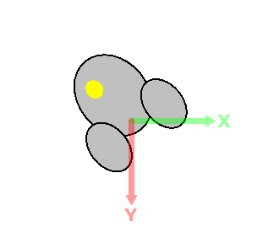
You can read more about these functions by going to
View->Object Browser
Download here
Did you know that you can use Elemento Figure Creator in 2D games developement?
Instead of spending much time adjusting parameters under game development,
you can create a simple model of your avatar in Elemento.
It requires little code and uses the same coordinate system as many 2D games.
This is possible because Elemento allows you to do physics simulations.
For example, to rotate a matrix node, add the following expression
to the Rotate property:
.Rotate+TurnKey()*DeltaTime()

You can read more about these functions by going to
View->Object Browser
torsdag 5. februar 2009
About Simulation and Stickman Physics
Stickman Animation Software - Download
This is the software algorithm that was the beginning of Stickman, now 7 years ago.
Bone simulation keeps two control points in constant distance.
Given two points, p1, p2 and constant distance n (scalar).
diff = p1 - p2
delta = n - |diff| (|diff| is the absolute value of diff, length of vector)
diff *= delta / |diff|
p1 += diff * delta * 0.5
p2 -= diff * delta * 0.5
You can replace 0.5 with 0.4 to have less stiffer simulation.
Iterate for each bone many times (10+)
Simulation with rigids, feedback and rope are company secrets, so I can't tell you.
This is the software algorithm that was the beginning of Stickman, now 7 years ago.
Bone simulation keeps two control points in constant distance.
Given two points, p1, p2 and constant distance n (scalar).
diff = p1 - p2
delta = n - |diff| (|diff| is the absolute value of diff, length of vector)
diff *= delta / |diff|
p1 += diff * delta * 0.5
p2 -= diff * delta * 0.5
You can replace 0.5 with 0.4 to have less stiffer simulation.
Iterate for each bone many times (10+)
Simulation with rigids, feedback and rope are company secrets, so I can't tell you.
søndag 25. januar 2009
onsdag 14. januar 2009
Stickman 5.2.24 Released
Click here to download
Hi folks!
Happy New Year!
Time to make some upgrades.
The new thing in Stickman 5.2.24 is that online content is much faster.
The old code timed out after 3 seconds, but with this one, it reads the data length from the HTTP header and then closes immediately after reaching the end.
Users that had problem with timeout can now use Stickman!
Welcome Mexico and other countries on the other side of the earth!
Hi folks!
Happy New Year!
Time to make some upgrades.
The new thing in Stickman 5.2.24 is that online content is much faster.
The old code timed out after 3 seconds, but with this one, it reads the data length from the HTTP header and then closes immediately after reaching the end.
Users that had problem with timeout can now use Stickman!
Welcome Mexico and other countries on the other side of the earth!
søndag 14. desember 2008
Key Down Actions
Stickman 5.3 Beta
Download from this site
The effectiveness of Stickman 5.3 will be on a high level because you simply press and hold a key to perform a specific action.
This sample move demonstrates 'Add Point to End A', 'Add Between Points B' and 'Delete Point D' with a polygon shape.
Download from this site
The effectiveness of Stickman 5.3 will be on a high level because you simply press and hold a key to perform a specific action.
This sample move demonstrates 'Add Point to End A', 'Add Between Points B' and 'Delete Point D' with a polygon shape.
lørdag 13. desember 2008
Sub Shape Clipping
Stickman 5.3 Beta
Download from this site
A frequently requested feature is now added to Elemento.
Sub nodes of a shape will now be clipped inside the region of the shape.
It was not possible to add a sub node to a shape earlier.
As you may notice in the sample movie below, all new shapes are put into a matrix node by default.
Download from this site
A frequently requested feature is now added to Elemento.
Sub nodes of a shape will now be clipped inside the region of the shape.
It was not possible to add a sub node to a shape earlier.
As you may notice in the sample movie below, all new shapes are put into a matrix node by default.
Abonner på:
Innlegg (Atom)