fredag 5. desember 2008

Patterns

Stickman 5.3 Beta
You can download here

I've experimented with something I call "Patterns".
A pattern is an intelligent structure that can be created by analyzing a figure.
For example "matrix leftArm is attached to leftArmBone".

Other examples:
"curve1 is deformed by point1.Pos, point2.Pos, point3.Pos"
"there is a rope connection between point4, point5 and point6"
"point1, point2, point3, point4 is connected to a rigid"

The good thing with patterns is that they can be changed.
For example, I want to make a leg a little longer.

In the bone tool, when you use the "move point" action, Stickman recognize all patterns connected to that control point.
Elemento updates the patterns while the user drags the control point.

tirsdag 25. november 2008

New Open Dialog

Stickman 5.3 Beta
Download (scroll to bottom)

Working on a new open file dialog that preview pictures (including Photoshop) and Stickman Elemento Figures. It just works!

mandag 24. november 2008

Start Relation is Removed

Stickman 5.3 Beta
Download (Scroll to bottom)

Today I removed the 'Start Relation' controls.
I think they just confused the user, took up screen space and created a mess.
Now, you can only create animated relations that do not 'jump'.
When releasing a relation, an 'after' draw order change is added.
The easier, the better.

For those that doesn't know what an relation is:
It's a connection between a figure and a matrix node inside another figure.
That connection moves the child figure when the parent is moving.
For example: To carry a box you select the box and choose the figure and hand to hold it.

søndag 23. november 2008

New Container Behaviour

Stickman 5.3 Beta
Download (Scroll to bottom)

The container behaviour is changed to the better.
Before, only empty matrix nodes were treated as containers.
Now, all matrix nodes are treated as containers.

This means that you can connect an item to a body part of another figure.
Figure designers don't need to think of creating container any more,
because the attached matrix nodes will automatically be a container in Stickman.

lørdag 22. november 2008

New Interface Changes

Stickman 5.3 Beta
Download (scroll to bottom)

Today I replaced the category list with some color buttons.
Still working hard to get the interface more easier and easier to use.
Got a lot of ideas, but if you got some, please contact me.

onsdag 5. november 2008

Almost so Easy as Thinking

I have been working a lot on the Stickman 5.3 Beta version.
A new and better way to use the tools:

One finger at the keyboard and the left mouse button!

Old procedure (camera tool):
1. Right click
2. Select 'Zoom'.
3. Drag with left mouse button.
4. Right click.
5. Select 'Move'.

New procedure:
1. Press Z for zoom.
2. Drag with left mouse button.
3. Release the Z button.

That saves the user for 4 mouse click for every action!

onsdag 1. oktober 2008

Some Big Interface Changes

I'm working on the Stickman 5.3 version, and I'm very thankful for the feedback I get. There seem to be a lot of people interested in the new version, since Stickman is moving from a rich color interface to a neutral professional looking interface.

I hope people enjoy the new render window, with YouTube, iPhone and DVD alternatives. A new function that has been asked for many times are the GIF export alternative.

A young man with the name Jonatan told me that he couldn't figure out how to move the background behind the figures. That can be done with the 'Draw Order' category.

Jonatan's brother, Bjørn Sverre, told me that he didn't like the F1, F2, F3 ... shortcuts. Bjørn Sverre asked me whether it was possible to use the numeric keyboard instead. A man from Australia with an injured arm has also asked me about this.

Yesterday morning, when I got out of bed, I started working on shortcuts. I found it difficult to use the numeric keyboard without typing numbers other places in the interface. Luckily, I found out that holding Ctrl blocks the input to text boxes.

The new keyboard shortcuts are like this (Ctrl+#):

Stickman
0 - Preview
1 - Figures
2 - Camera (animated)
3 - Matrix tool
4 - Control points tool
5 - Design camera
6 - Switch tool
7 - Path tool
8 - Speaker tool
9 - Volume tool

Elemento
0 - Run debug
1 - Selection
2 - Bone tool
3 - Placement
4 - Control points tool
5 - Camera
6 - Switch tool

While working on this, I suddenly had a brilliant idea. I merged 'Draw Order' with 'Figures' and got this new interface:
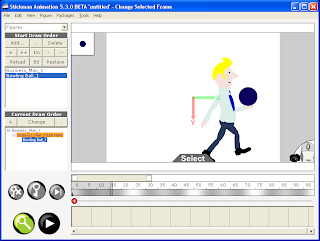


Then I found out that 'Containers' can be merged with 'Animation', visible when 'Matrix Tool' or 'Path Tool' is activated.
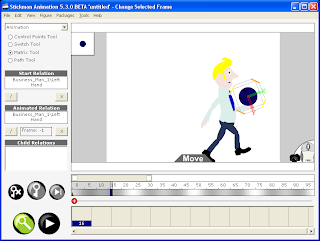


I hope this will help new users to overcome some of the new beginner struggles.