lørdag 20. september 2008

New Design

I have been working on the new interface design.
Replacing all the black backcolor made the interface much brighter.
Replaced Navy blue color with DimGray at the tool headers.
Here is a screenshot so far:

fredag 19. september 2008

Create Animated GIF

Here are some gif animations I've created with the upcoming Stickman 5.3.


Stickman 5.3 will include two new function:
1. Paste Drawing From Clipboard (removes the background color).
2. GIF export in CA (Create Animation).

This is how I did it:

1. Draw the frames in MS Paint:
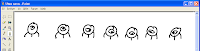


2. Open Stickman. Select 'New Figure'.

3. In MS Paint, select a frame and use Ctrl+C to copy to clipboard.
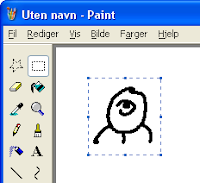


4. In Stickman CF (Create Figure), goto Edit->Paste Drawing From Clipboard.
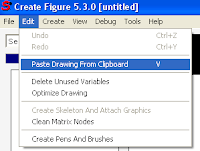


5. Repeat step 3-4 for every frame.

6. In Stickman CF (Create Figure), goto Create->Control->Switch.

7. Put all images inside the switch.
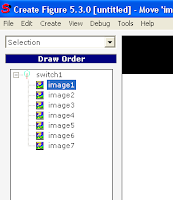


8. Select 'Placement' and resize the figure so it fills the screen.

9. Save the figure and add it to Stickman CA (Create Animation).

10. Use the switch tool to flip the images. Create a key frame for each 5th frame.

11. Render as GIF Animation with 5 frames per second and resolution 64x64.

torsdag 18. september 2008

New Stickman Logo

Karine designed a cool new logo for Stickman.
Here it is:

onsdag 17. september 2008

Time Delay Fixed

The new version of Stickman (5.3) will be much faster to receive news or to browse the online library. Users that had problems with time delay between the server in Norway and their location will get a better experience.

The problem was to detect the length of the data stream received over HTTP. Before, the length was unknown. Therefore Stickman had to wait some time before disconnecting the data stream. I found a method to read the data stream length. Now the data stream is closed immediately at the end. This means better speed.

mandag 15. september 2008

Name Changes

Stickman & Elemento is now becoming 'Stickman'. The reason of this name change is that Stickman & Elemento are no longer two programs, but two different tools in the same program. Perhaps some customers are confused when they order, wondering if Elemento comes with Stickman, or if they need to order Elemento too.

Stickman & Elemento -> Stickman
Stickman -> Create Animation (CA)
Elemento -> Create Figure (CF)

The figure file format will still be elemento.

søndag 14. september 2008

So Much Rewriting of Code!

I decided to change something that hasn't changed since Stickman 1.0. That's three years ago! What I wanted to do: Let the user choose tool action by right-clicking in the work area.


The problem was that, for example in matrix tool, the right+drag was used to rotate. So I had to rewrite all tools to use the new standard. From now on, the user will only use the left mouse button in a tool. Notice the icons on the left side of work area are removed and put into the right-click menu.

Another new feature is snapping. Snapping is turned on by default, you can turn it off by right-click and uncheck 'Snapping On'.

fredag 12. september 2008

New Stuff Coming Up

I've been working on the next version of Stickman for a while. There will be some big changes and many small ones.

One thing I discovered was that the toolbar with the shortcuts (F1, F2, ...) is a bad habit to use. Most users never find out how the software is structured because of this. I want people to develop from beginners to advanced users without getting boring. So I removed the toolbar in the new version, leaving the user with a drop down list and shortcuts.

The general idea is to let the user with two choices:
1. Select the appropriate tool from a list box
2. Use shortcuts

No colored toolbar that make bad habits.
Here's a screenshot of new interface of Stickman:
(the version number is not changed yet, the new version will be 5.3)


The interface does not look very fancy, but it's cleaner and I love it. It looks more like the old interface of Stickman 4, but I think new users will learn quicker.